


General NTD Reporting - Frequently Asked Questions
New to NTD Reporting? Please review the NTD Basics Section here. Historical FAQs are available on the Archived Questions and Answers page.
Please also refer to the Knowledge Base Articles published here. These provide a step-by-step overview of common NTD processes.
FAQs by Section
NTD Basics
Resources for New Users
- How do I request an ID to begin reporting to the NTD?
- Where can I find information on NTD trainings?
- I am experiencing an error in the NTD Reporting System. Who should I contact?
How do I request an ID to begin reporting to the NTD?
To request an ID to report to the NTD, please visit this page. At the top of the page, you will find a link for "NTD ID Request Application" - clicking that link brings you to a page to enter your email address which will send you a six-digit code to enter. After entering the code and verifying your email address, you will be prompted to begin completing the required forms. Once the request is officially submitted, the NTD team reviews the application to confirm the services are eligible for reporting and may contact you with questions or concerns. Once the request is approved and your NTD ID is created, you will receive an email from your Validation Analyst with information on getting started.
Where can I find information on NTD trainings?
You can find details on upcoming NTD trainings and conferences here. To view recordings and/or slide decks of previous presentations and webinars, please visit this page. You can find recordings of previous webinars pertaining to Urban Reduced Reporters, State Rural Subrecipients, and other pertinent NTD topics.
I am experiencing an error in the NTD Reporting System. Who should I contact?
If you are experiencing a technical error or unexpected system behavior in the NTD Reporting System, please email the FTA IT Help Desk at FTAITHelpDesk@dot.gov. Please feel free to copy your assigned NTD analyst on the communication for their awareness.
Accessing the NTD Reporting System
- How do I login to the NTD online reporting application?
- How do I reset my password?
- How will I receive announcements about NTD reporting?
- How do I change my user role and/or someone else's user role in the system?
- How does my agency add new users to the system?
How do I login to the NTD online reporting application?
Beginning in 2021, there is a new login process that uses login.gov for all FTA TriAD applications, which include the NTD. To login, please consult the guidance on this page. If this is your first time setting up an account with login.gov, please consult the same presentation. There is also a quick setup guide on this page.
If you have forgotten your password, reset by following the instructions on this page. If you know your password and wish to update it, please follow the instructions on this page.
How will I receive announcements about NTD reporting?
The NTD Operations Team will send out an email when there is an important announcement. It is important that your username is a valid address that you can access for emails. You can also view the announcement message by navigating to the “Announcement” section on the right-hand side of the Home page. Finally, the message will be stored in the E-File Library within your Agency's NTD Profile.
How do I change my user role and/or someone else's user role in the system?
There are two ways to change roles:
1) Navigate to the "User Management" portal by clicking the 3x3 grid icon to the left of the profile icon in the upper right > Select "User Management" from the drop-down menu > Search User > Select User Profile > Related Actions > Manage User Roles, and make the necessary changes.
2) Navigate to the Agency Profile from the Home tab of the NTD portal > Related Actions > View & Manage Reporter Users (P-30) > Select the last name of the person you want to edit and navigate to Manage User Roles.
Please note the following:
- Only an agency User Manager (UM) can modify user roles.
- You must remove any previous roles before adding a new role, and you cannot change your own role.
How can I add new users to the system?
Your agency's User Manager(s) can add new users to the system. To do this, the User Manager (UM) navigates to the "User Management" portal by clicking the 3x3 grid icon to the left of the profile icon in the upper right, selects "User Management" from the drop-down menu, then selects Create New User.
If your User Managers(s) are no longer with your agency, your agency's CEO can email your Validation Analyst to identify new users to fill that role.
Completing NTD Forms and Validation
- What is the Report Year Kick Off (RYKO)?
- When is my Annual Report due?
- How do I submit the Annual Report?
- Do I have to complete all forms and respond to issues right away in order to save my work?
- How can I view issues with my report?
- How can I address the data validation issues?
- How do I import or export data/templates from an NTD report?
- Are there standard external templates that the FTA requires agencies to use to manage NTD data collection?
- How do I know the Annual Report is ready to submit?
- How can I request a waiver from Annual NTD Reporting?
- How do I apply for an extension for my Annual Report?
- I am able to log in but I can't access anything. What should I do?
- How can I view/print a prior year's reports?
- What are the record retention requirements for NTD source data?
- Does the NTD support any application programming interfaces (APIs) for filing and completing report?
What is the Report Year Kick Off (RYKO)?
The Report Year Kick Off (RYKO) is a task within the NTD reporting tool generated on the first day of the agency's new fiscal year. The agency should complete the task within the first month of the new fiscal year to generate the Annual Report Package for the fiscal year completed most recently and the monthly reports (Full Reporters only) for the upcoming fiscal year. The kickoff task is assigned to the CEO, CEO Delegate (if applicable), and NTD Contact users; however, once one user initiates the kickoff, it will no longer appear in the other user’s task list. During the RYKO, you will confirm your agency’s users, modes, reporter type, and Transit Asset Management (TAM) Sponsor.
FTA determines each agency’s NTD report due date based on the agency’s fiscal year end date. Reporters submit their Annual Report four months after their fiscal year ends.

How do I submit the Annual Report?
Only the users with CEO or CEO Delegate roles can submit the Original Submission of the Annual Report. The NTD Contact can submit all subsequent revisions. If you are unsure of your user role, please contact your transit agency's assigned user manager.
To submit the report, log in and select:
- The Report Year package you wish to submit
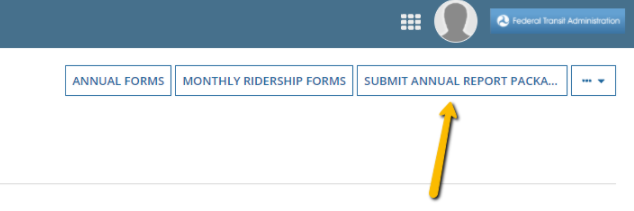
- Submit Annual Report Package (top right)
- Proceed and Continue through the process until you see a notification, "Action Completed Successfully".
Note: Saving the D-10 CEO Certification form is not how you submit the report.
Do I have to complete all forms and respond to issues right away in order to save my work?
No. If you want to enter a part of a report form and come back to it later, click the “Save” button (at the bottom of the report). When the form is complete and ready for review, the “Save and Validate” button applies the rules of validation to all data entered in the form. Select this option every time you revise data after completing the forms to avoid encountering any issues upon submitting your report.
Please note, most forms have certain required fields that will prevent the system from saving the data if the required fields are not filled out.
How Can I View Issues with my Report?
After clicking the “Save and Validate” button, click “View Issues” at the bottom of the form. This page displays all validation issues and allows you to respond accordingly, either by revising the data or providing explanations. To review an issue, click on the row with the issue and it will highlight in blue. The validation issues details will appear in an expanded section below. After addressing all validation items, you will be able to submit the report for review based on your user role.
You can also view all issues from all forms at once by navigating to the Report Package and clicking "View Issues" in the top right corner. From there, you have the option to filter issues using the dropdown menus at the top of the table to limit the list to specific forms, modes, etc.
How Can I Address the Data Validation Issues?
The system categorizes issues as either "Critical" or "Important." Critical issues typically flag data that represents a logical impossibility or data that must match another value but does not. For Critical issues, the agency must navigate back to the appropriate form and revise the incorrect values. After making your change(s), select the “Save and Validate” button again. If the error is sufficiently addressed, the item will be removed from your list of "Open" issues and the status will change to “Closed with Data Revision” on the “View Issues” page. (This status is automatically updated and does not require analyst approval.)
Important issues typically flag significant variances from your own prior year data or deviations from an expected range based on industry averages. For Important issues, you should start by reviewing the data entered to ensure accuracy, and once confirmed, you should provide an explanation in the comment section of the validation issue detailing what operational or environmental change led to the data reported. After adding a comment, the issue status will change to “Open with Explanation." FTA will review these comments with each report submission and close issues accordingly.
How Do I Import or Export Data from an NTD Report?
To use the import/export functionality, you must start by exporting the most current version of the form from your NTD report. To do this, navigate to an annual report form, scroll to bottom and click “Export Data.” A downloadable excel version of the form will populate. Click on the file to open it and begin entering data into the export template.
Once the sheet has downloaded, you can enter or edit existing data in the form. The sheet is protected and will not allow tabs to be hidden, deleted, or altered. When the form is complete, save the file. Then, navigate back to the form and click “Import Data," to import the data you've entered in the excel sheet.
Please note, if the system does not process the import, it will alert you to errors in the file uploaded that need to be addressed before attempting to upload again. If you have questions about how to resolve those errors, please send the file you are attempting to upload along with a screenshot of the errors noted to your Validation Analyst.
Agencies are responsible to process their own data for submission into the NTD. Agencies and contractors supporting data collection are free to produce their own resources to collect the required data that is submitted to NTD. FTA does provide an import/export functionality to NTD users within the reporting system (see “How to I Import/Export Data from an NTD Report?”). However forms may change year to year, and thus must be downloaded directly from the NTD Appian reporting system.
How do I apply for an extension for my Annual Report?
Per the NTD Policy Manual, FTA may approve 30-day extensions for extenuating circumstances such as medical leave, natural disasters, and incomplete audits.
To submit an extension, the CEO or CEO Delegate must log in and select:
- The current Report Year package
- Related Actions (under the heading)
- Create Reporter Request
Once on the "Reporter Request" screen, select "Extension Request" from the "Request Type" drop-down menu, then explain why you are unable to meet the deadline in the explanation field.
I am able to log in but I can't access anything. What should I do?
Your account is locked. After logging in, you will be prompted with a screen shown below prompting you to unlock your account.
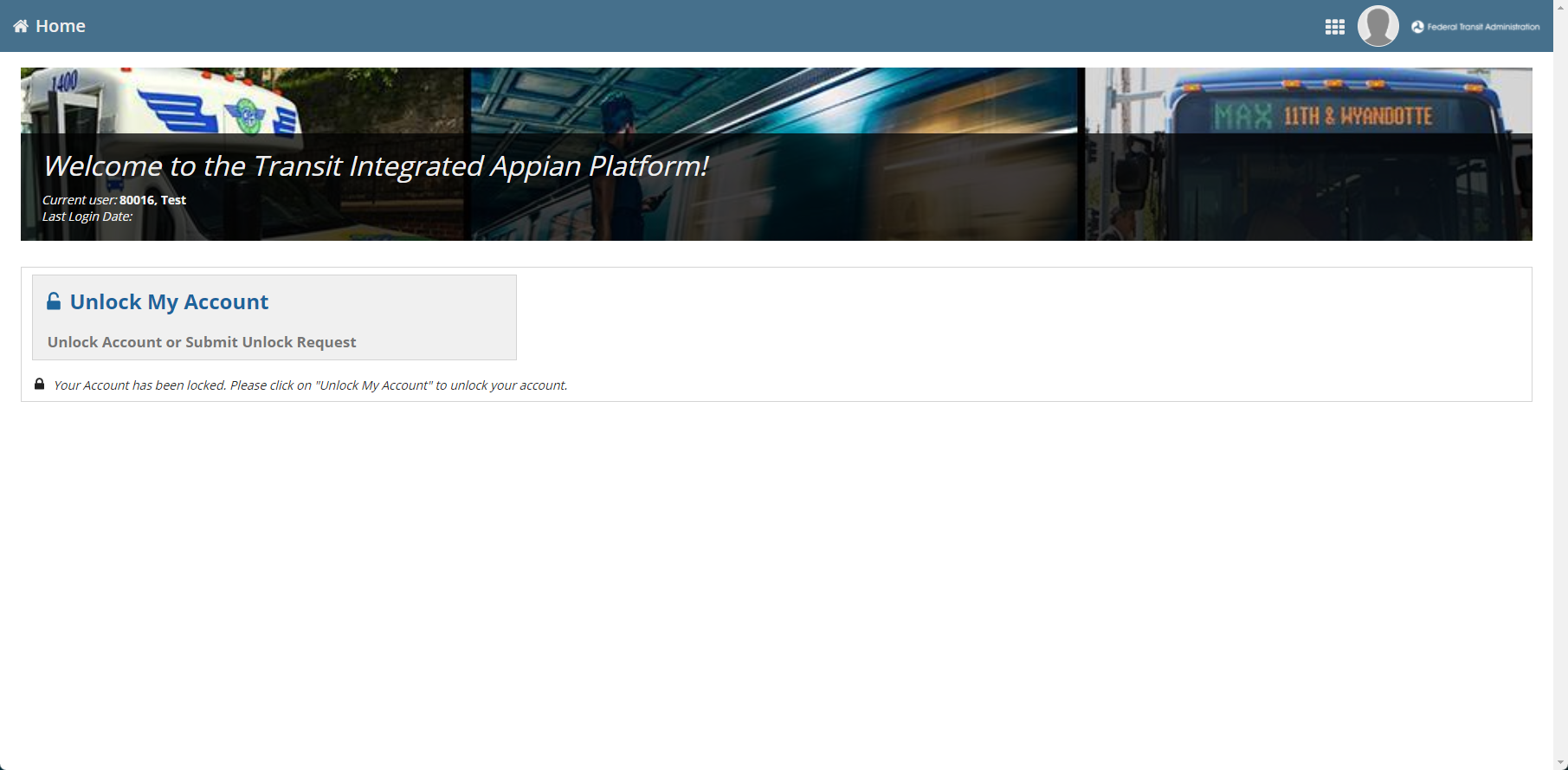
After clicking on the Unlock My Account button, you can choose how you wish to unlock your account. You can do so by correctly answering your security questions or submitting an Unlock Request prompting your agency's User Manager to unlock your account. Pages 61-66 of the FTA FACES User Guide found here depicts how an account becomes locked, the steps to self-unlock, as well as the steps for how a locked user may submit a request for unlock.
If you no longer remember the answers to your security questions, please email your Validation Analyst requesting that they reset your Security Questions. Once your Validation Analyst processes the reset, you will receive a task in your Tasks tab within the NTD reporting system prompting you to establish new questions and answers.
How can I view/print a prior year's reports?
There are two ways to view or print your reports: (1) by individual form, or (2) by the entire report all at once.
(1) To view or print each form individually:
- Navigate to the Agency Profile from the Home tab.
- Click on Form Library (under the heading).
- Select the closeout version from the "Report Package" drop-down menu.
- From there you can click on each form individually to view or print.
(2) To view or print the entire report all at once:
- Navigate to the Agency Profile from the Home tab.
- Click on Related Actions (under the heading).
- Select Print Annual Package.
- Select the closeout version from the "Report Package" drop-down menu.
- Click the Print button.
It will take a few minutes to generate the HTML link that will allow you to view and print the report. After 20-30 seconds, click the "Refresh" button to return to the previous page (you may have to click on it more than once). When the site returns you to the previous page, you will see an HTML link right below the "Print Annual Forms" heading. This link will allow you to view or print the report in its entirety. This process works for any version (revision) of the report.
Please note: State users can print all subrecipient forms by navigating to the profile, selecting "Print Multiple Annual State Packages" and selecting the desired year and subrecpient agencies' packages you'd like to print.
What are the record retention requirements for NTD source data?
For information related to FTA record retention requirements, please refer to this FTA Circular.
Does the NTD support any application programming interfaces (APIs) for filing and completing report?
No. The NTD does not currently support any APIs to file and complete reports. FTA appreciates feedback and input regarding this topic, however at this time, there is no data collection API in lieu of interacting with the NTD Reporting System.
NTD Reporting Modules
Basic Information
- My agency has a contract with a Transit Network Company (TNC). Can I report this to the NTD?
- How do I determine my demographic information?
- What if I switched contractors during my report year?
- Do I need separate B-30 Contractual Relationship forms for one contractor providing multiple modes of service?
- What is a UEID?
- What is the Federal Transit Administration (FTA) Recipient ID?
- How do I add a subrecipient?
- Are services provided by agencies participating in local public transit-human services transportation plans eligible to report to the NTD?
I have a contract with a Transit Network Company (TNC). Can I report this to the NTD?
You may report mobility service operated under contract to a transit agency if the following apply:
- Your agency pays the full cost of the contracted service (less fares).
- The service is available to the general public or segment of the public defined by age, disability, or income.
- The service is regular and continuing and is not a pilot program.
- The operator or transit agency attempts to group rides to create shared-ride service.
- Drivers and passengers cannot refuse additional passengers if there is available seating capacity.
- The operator must allow two or more dependents to travel with guardians if there is available seating capacity, even if this would limit the ability to successfully share the ride.
Please note, all new TNC services reported to the NTD are reviewed in detail to ensure reportability criteria are met. You will be asked to answer specific questions regarding the operations and agreement between the two parties.
How do I determine my demographic information?
Service area is the square miles and population to which your service is available. This is not the same as the Urbanized Area(s) (UZAs) you operate in.
ADA legislation requires that your service area include at least 3/4 of a mile on each side of your fixed route service. Service area also includes a blanket map of where all demand response/deviated route service is available. Most demographic information is readily available from the metropolitan planning organization in the region.
What if I switched contractors during my report year?
You complete B-30 Contractual Relationship forms for both contractors that provided your service during the year, and you indicate the number of months each contractor operated.
If the contract details collected in the "Primary Feature" section of the B-30 Contractual Relationship form are identical between the two modes, you can use a single B-30 form and show more than one mode of service provided by a single contractor. If the "Primary Feature" details differ, you should report the modes on separate B-30 forms.
An FTA Recipient ID Number is a four-digit number assigned to your transit agency for the Transit Award Management System (TrAMS). If you are not a direct recipient, you should report the FTA Recipient ID of the agency from which you receive Federal funding.
On April 4, 2022, the federal government stopped using the DUNS Number to uniquely identify entities. Now, entities doing business with the federal government use the Unique Entity ID created in SAM.gov. In the NTD, this is abbreviated as UEID on the Identification form (P-10).
- From the Home page in the NTD reporting system, select the Current State report package.
- Click on the "Related Actions" link (under the heading).
- Select "Manage Subrecipients."
The projects selected for funding under the Enhanced Mobility for Individuals and Individuals with Disabilities (Section 5310) Program must be included in a locally developed, coordinated public transit-human services transportation plan, and that the plan be developed and approved through a process that included participation by seniors, individuals with disabilities, representatives of public, private, and nonprofit transportation and human services providers and other members of the public utilizing transportation services. These coordinated plans identify the transportation needs of individuals with disabilities, older adults, and people with low incomes, provide strategies for meeting these needs, and prioritize transportation services for funding and implementation.
Some agencies that participate in a local human services transportation plan provide client-based transportation services — services that can be used only by its clients. These are not public transportation services because they are only open to a segment of the general public that is defined by being clients of the agencies and not, as required by the public transportation definition, a segment of the general public defined by age, disability, or low income.
Therefore, only agencies that provide public transportation are eligible to report financial and operating information to the NTD. Participation in a local human services coordination plan by itself is not a sufficient condition for reporting to the NTD.
Service
- What are Vehicles Operated in Maximum Service (VOMS)?
- My agency uses Automatic Passenger Counters (APCs). Do we need to do anything in order to use that data to report to the NTD?
- Do I report charter service?
- How do I report deviated fixed route service?
- Do I include the attendant who rides with and assists my passengers with disabilities in my Unlinked Passenger Trip (UPT) total?
What are Vehicles Operated in Maximum Service (VOMS)?
This is the largest number of vehicles you operated in this mode at any point during the year — in other words, the number operating at peak service during the busiest average day of the year. Days of special service aren't factored into the VOMS count. It also does not include spares and will typically be smaller than your total fleet size.
Before an agency can use any APC data to report to the National Transit Database (NTD), the FTA must approve the APCs. The NTD Policy Manual explains the APC certification process and provides a checklist of the information the agency should prepare and attach with the request.
To submit an APC certification request, the agency's CEO (or CEO Delegate) user should navigate to the current annual report package, click Related Actions (below the heading), then select "Create Reporter Request." From there, select "APC Certification Request" from the drop-down menu and upload the necessary information. This request will be routed to your Validation Analyst who will coordinate the review of the request and any follow up questions from the review team.
Although charter service is not considered public transportation, if you report as a Full Reporter and you performed charter service during the year, you must report charter hours on a separate line on the S-10 Service form. All data related to charter service should be excluded from the other totals.
How do I report deviated fixed route service?
Agencies must report all deviated fixed route services as Bus (MB).
Transit agencies must include personal care attendants and companions in UPT counts as long as they are not employees of the transit agency. This includes attendants and companions that ride fare-free.
Asset
- My agency is participating in my State DOT's group Transit Asset Management (TAM) plan. How do I indicate this on my NTD report?
- What are the requirements for Voluntary Reporters for the new expanded asset inventory module (AIM)?
- My agency receives §5310 funds, but we only provide client and center-based transit services. Do we report to the NTD as a Reduced Asset Reporter?
- We have capital responsibility for a bus barn: how do I report it on the A-15 Transit Asset Management Facilities Inventory form?
- How should I report administrative or maintenance facilities that are shared with other departments within a larger entity?
- How should I report seating capacity for vehicles with removable seats or slot floor systems?
- What is the difference between the term Useful Life Benchmark (ULB) for TAM purposes and the term "useful life" used in grants management?
During the Report Year Kickoff (RYKO), you will be able to select your agency's TAM sponsor. If you have already completed the Report Year Kickoff but did not select a sponsor and need to, please contact your Validation analyst, and they will help you.
What are the requirements for Voluntary Reporters for the new expanded asset inventory module (AIM)?
Voluntary Reporters must complete the National Transit Database (NTD) report in its entirety. With the expanded asset inventory, Voluntary Reporters should provide inventory data for the A-15 Transit Asset Management Facilities Inventory, A-35 Service Vehicle Inventory, A-20 Transit Way Mileage, etc., as applicable. If a Voluntary Reporter has capital responsibility for a fleet, they must report the Useful Life Benchmark (ULB) of that fleet on the A-30 Revenue Vehicle Inventory and A-35 Service Vehicle Inventory. They are not required to report A-90 targets, condition assessments for facilities, a narrative report, nor performance restrictions for track.
No, client- and center-based transit services are not considered public transit services. You are not required to report to the National Transit Database (NTD).
You would report this facility as a Vehicle Storage Facility.
If your use of the facility is 50% or less, it is considered incidental use and you should not report this facility. For example, if your agency administration offices are a part of a city hall building and your offices make up less than 50% of the entire city hall building, the transit use is incidental and this facility does not need to be inventoried.
How should I report seating capacity for vehicles with removable seats or slot floor systems?
Agencies should report the full potential seating capacity for a vehicle on the A-30 Revenue Vehicle Inventory form. Sometimes agencies may purchase a vehicle with the capacity to add more seats as needed. In these cases of a varying number of seats, the maximum potential seating capacity should be reported. For example, the vehicle may have a potential seating capacity of 15 but may only have 12 seats installed. For seating capacity on the A-30 form, the agency would report 15 in this example to capture the full potential seating capacity of the vehicle.
A ULB is distinct from the term “useful life” or “minimum useful life” that applies to FTA grant programs. Under FTA grant programs, “useful life” refers to the Federal financial interest in a capital asset, which is based on the length of time in service or accumulated miles. Generally, assets are not eligible for replacement with FTA funds until they have met or exceeded their minimum useful lives. A ULB, however, takes into consideration operational factors that may impact the condition of a capital asset. Thus, a ULB that is less than the useful life for grant programs may impact a transit provider's ability to maintain their SGR targets.
Declaration
There are two National Transit Database (NTD) auditor's statements - the Independent Auditor's Statement for Federal Funding Allocation Data (IAS-FFA) and the Independent Auditor's Statement for Financial Data (IAS-FD). In broad terms, the IAS-FFA reviews an agency's allocation of data on the FFA-10 form, and the IAS-FD reviews the agency's accounting system and it's translation to NTD financial data requirements. More information on the requirements/applicability of each can be found in the most recent NTD Annual Reporting Policy Manual.
Suggested procedures for the Independent Auditor's Statement for Federal Funding Allocation Data (IAS-FFA) can be found in an appendix to the manual. The appendix of the policy manual also contains templates for both auditor statements.
Please note, National Transit Database (NTD) auditor's statement procedure is not the same as annual financial audits.
Federal Funding Allocation
- Where does the Data from Other Forms column get its data?
- How do I update data on the FFA-10 Federal Funding Allocation form when the UZA Reporting Method is Actual Vehicle Revenue Miles?
- What is the purpose of the FFA-10 Federal Funding Allocation?
- Did FTA use the same data in FFY 2022 and 2023 formula apportionments?
Where does the Data from Other Forms column get its data?
Vehicle Revenue Miles (VRM), Vehicle Revenue Hours (VRH), Passenger Miles Traveled (PMT), and Unlinked Passenger Trips (UPT) are pulled directly from the service form (S-10 or RR-20). Operating Expenses (OE) are pulled directly from the financial form (F-30 or RR-20).
If you update data after completing your FFA-10 form, you will need to return to the FFA-10 form to make updates before submitting. If you allocate data using the Actual Vehicle Revenue Miles method but the VRM value is not the data you need to update, you can use the "Recalculate Form" button below the UZA Reporting Method selection to prompt the form to refresh the values. Once the data is updated, click "Save and Validate."
What is the purpose of the FFA-10 Federal Funding Allocation form?
This form compiles all data required for Federal funding allocation into one location. The form reports service totals and operating expenses for each of the individual areas the agency serves — urban or rural. The data on this form are used in the appropriation of formula program funding.
Did FTA use the same data in FFY 2022 and 2023 formula apportionments?
The FFY 2022 and 2023 formula apportionments (e.g., Urbanized Area Formula Funding Program, Formula Grants for Rural Areas) used Report Year 2019 NTD data for some agencies across both years. More detail on why this occurred and the procedure FTA used can be found here.
Financial
- What if my agency operated on a deficit?
- Where do I report Congestion Mitigation and Air Quality (CMAQ) funds?
- My agency uses Transportation Development Credits (TDCs) or Toll Credits as matching dollars. How are these reported?
- What are fully allocated costs?
- What is the difference between Funds Applied and Funds Not Applied?
- I received Tribal Transit discretionary funds to purchase a vehicle. What funding type should I select?
- Where do I report Title III-B Funds?
What if my agency operated on a deficit?
If operating on a deficit, you will report more expenses than revenues. If you made up the difference using funds earned in a previous year, report funds expended greater than funds earned on the line corresponding to the original source of funds. If you borrowed against future revenues using a bond or loan, report the expenses on the line corresponding to the source you expect to use to repay the debt. More information on reported bonds/loans can be found in the NTD Policy Manual.
Please note, only Full Reporters report Revenues Earned in order to show more funds expended than earned. Reduced Reporters only report expenses and should report the total cost of operating for the year.
Where do I report Congestion Mitigation and Air Quality (CMAQ) funds?
If the CMAQ funds were "flexed" through the 5307 program, you report them as 5307 funds. If they were not, you report the funds as Other USDOT Funds.
Beginning in Report Year 2018, your financial form includes a line to identify the amount of Transportation Development Credits or Toll Credits applied as matching funds.
What are fully allocated costs?
Fully allocated costs are the costs of providing the service itself and the indirect costs incurred by the agency for the oversight of the contract or service.
It is inaccurate to report that the agency only bears the cost of service. The agency must report the cost of salaries and fringe benefits for transit agency employees who oversee the contract/service or work with the contractor. Providing an office with electricity, phone, internet, etc., for these employees is also an indirect cost of service. Note that if only a portion of an employee's time covers oversight of a contract, then you only apply that portion of the employee's salary and benefits. The same is true for office costs.
What is the difference between Funds Applied and Funds Not Applied?
Funds Applied refers to funds that your agency transferred to some other entity. For example, interest payments made to a bank are Funds Applied.
Funds Not Applied refers to any expenditure that does not involve a transfer of money between the transit agency and another party and that is typically valued using accounting principles. For example, you would report depreciation as Funds Not Applied.
You would select Rural Area Formula Program (RAFP) – 5311 funds.
Where do I report Title III-B Funds?
You report these funds under "Other Federal Funds."
Safety and Security
- What constitutes an assault on a transit worker? How does this differ from the existing definition of assault?
- A passenger spit on a bus operator while boarding the vehicle. The bus operator denies transport for medical attention and resumes service. How should this be reported?
- A station attendant was followed and threatened by a passenger waiting to board the next train. Is this considered an assault?
- A vehicle maintenance employee attempted to board a bus to diagnose a mechanical issue with the bus’s windshield wipers. The employee was pushed off by an angry passenger but did not sustain any injuries. How should I report this?
- Are agencies who operate Commuter Rail and Alaska Railroad modes subject to the requirement of reporting assaults on transit workers?
- How do I report multiple assaults on passengers and a transit worker by the same assailant if only some of the victims were transported for medical attention?
- How do I report transit worker assaults as a reduced or rural reporter?
- What events are excluded from NTD reporting?
- Are events that occur at bus stops not reportable to the NTD?
- Why can’t I find this month’s Safety and Security Data?
- Where can I access Safety and Security data?
- Can I view Safety & Security reports for our agency that were submitted to National Transit Database (NTD) in previous years?
- I completed a Major Event Report (S&S-40) for the month. Do I have to complete a Non-Major Summary Report (S&S-50) for that month also?
- A passenger on one of our transit vehicles had a medically related injury (i.e., heart attack, seizure) and was removed from the scene by an ambulance. Should I report this incident to the NTD?
- We discovered we failed to report a major event that occurred three months ago. The Policy Manual states a reportable event should be filed no later than 30 days after the date of the event. Should we still report this event?
- When are my Safety & Security reporting forms due?
- Am I supposed to report minor collisions on the Non-Major Summary Report (S&S-50) form?
- A pedestrian was struck and injured by one of our trains that was running on a test line and not in revenue service. Should I report this event to the NTD?
- One of our transit vehicles was backing up and hit a car with its rear-end. How do I report the collision type for the transit vehicle? (assumes a reporting threshold was met)
- If a bus is deadheading and is involved in an accident that meets a threshold, is it reportable?
- I need to add another involved vehicle in a collision report I submitted. How do I add other vehicles to this report?
An assault on a transit worker is a circumstance in which an individual knowingly, without lawful authority or permission, and with intent to endanger the safety of any individual or with a reckless disregard for the safety of human life, interferes with, disables, or incapacitates a transit worker while the transit worker is performing the duties of the transit worker. This definition above is specific to transit workers. Assault is defined as an attack by one person on another without lawful authority or permission. This definition applies to assaults on those other than transit workers.
This would be reported as a non-major event as a physical assault on a transit worker (operator) since the spit contacted the transit worker. If the assault involved spitting near or did not make contact with the transit worker, this would be reported as a non-physical assault.
Yes, threats or intimidation that do not involve physical contact with the transit worker are considered non-physical assaults and should be reported as a non-major assault on a transit worker.
A vehicle maintenance employee attempted to board a bus to diagnose a mechanical issue with the bus’s windshield wipers. The employee was pushed off by an angry passenger but did not sustain any injuries. How should I report this?
Since the transit worker did not sustain any injuries that required transport away from the scene, this would be reported as a non-major physical assault on a transit worker.
Are agencies who operate Commuter Rail and Alaska Railroad modes subject to the requirement of reporting assaults on transit workers?
Yes, per the Bipartisan Infrastructure Law (BIL), each recipient of Chapter 53 funds must comply with the requirements to report non-major assaults on transit workers. This includes Commuter Rail and Alaska Railroad modes. This will appear on the S&S-50 Non-Major Form.
How do I report multiple assaults on passengers and a transit worker by the same assailant if only some of the victims were transported for medical attention?
Since the threshold for a major event was met due to transport away from the scene for medical attention, and a transit worker was assaulted, this would be reported as one major assault on a transit worker. The transit worker assault would be noted in the event description, and include the appropriate patrons transported for medical attention (whether or not it was the worker).
How do I report transit worker assaults as a reduced or rural reporter?
Beginning in Report Year 2023, rural and reduced reporters will report the count of transit worker assaults in the S&S-60 Form annually. State DOTs will complete this form on behalf of their subrecipients and reduced and tribal reporters will complete the form as part of their annual report package. Full Reporters will continue to report these data in their monthly S&S forms.
What events are excluded from NTD reporting?
The following events are not included in NTD reporting:
- Security events occurring at bus stops or shelters that are not on transit-owned property that do not involve a transit vehicle or a person boarding/alighting from a transit vehicle.
- Events that occur off transit property where affected persons, vehicles, or objects come to rest on transit property after the event. For example, if a car hits a person on a city street and throws the person onto streetcar rail right-of-way, this would not be reportable to the NTD.
- Occupational safety events occurring in administrative buildings. For example, generally events that are reported to OSHA are not reported to the NTD. This also includes events that take place on contractor sites that do not involve active transit infrastructure.
- Deaths that are confirmed to be a result of illness, drug overdose, or other natural causes, outside of a reportable event. For example, if a fatality involving a drug overdose occurs on a transit vehicle, it is not reportable to the NTD.
More examples can be found in the NTD Safety and Security Policy Manual.
Are events that occur at bus stops not reportable to the NTD?
Generally, events that occur at bus facilities are not reportable unless the facility is owned by the agency operating the service. This is more common for larger Passenger Facilities or Stations (see NTD Glossary for more details). There are exceptions if the event involved a transit vehicle or if the people involved were boarding or alighting the vehicle. Please consult the NTD Safety and Security Policy manual or contact your Safety and Security analyst if you have any questions on the reportability of an event.
Why can’t I find this month’s Safety and Security Data?
Safety and Security data are published several months after the initial collection. This allows for validation and review of each report. The most recent month’s data can be found on the NTD Data page of the NTD website, which is typically four months after collection.
Where can I access Safety and Security data?
Safety and Security data can be found on the NTD Website under “NTD Data” in both Microsoft Excel Files and as full datasets on the Department of Transportation’s Open Data Catalog.
Yes, you can view reports from past years. Click on the "Reports" menu selection. From the list of reports, click on "Historical S&S Form Lookup" and complete the four query boxes to select the data you choose to view.
No, you do not report illnesses or medical conditions, or injuries resulting from illnesses or medical conditions, that occur in transit vehicles or facilities.
Yes, report this accident as a "Collision" on a S&S-40 Major Event Report form. Events meeting a reportable threshold are reportable to NTD once the project has entered the engineering and construction phase. Any event where a train makes contact with a person is automatically reportable regardless of whether the person was injured.
In the "Other Vehicle Involved Information" section, under the "Collision Type" category, select “Other Rear Impact."
Yes. The S&S-50 Non-Major Summary Report captures monthly summary information (not details) on fires and other less severe safety events that are NOT reportable on the S&S-40 Major Event Report. You must complete one S&S-50 Non-Major Summary Report form every month for each mode/type of service (TOS) whether or not you have data to report and even if you submitted an S&S-40 Major Event Report for that month.
If a bus is deadheading and is involved in an accident that meets a threshold, is it reportable?
Yes, this is a reportable event on the S&S-40 Major Event Report form.
Yes, please report the event as soon as possible. You must submit a complete set of major event reports for the report year by the S&S-20 Safety and Security CEO Certification form submission deadline. Agencies may not edit S&S-40 Major Event Report forms or S&S-50 Non-Major Summary Report forms in NTD after the following calendar year has ended.
When are my Safety & Security reporting forms due?
- S&S-50 Monthly Summary Reports are due by the end of the following month. For example, the January S&S-50 form(s) are due by the end of February.
- An S&S-40 Major Event report form is due no later than 30 days from the date of the event.
- S&S-30 Security Configuration forms and the S&S-20 CEO Certification forms are due by the end of February each year.
Reminder notices for unsubmitted S&S-50 forms are emailed on the 20th of each month.
Am I supposed to report minor collisions on the S&S-50 Non-Major Summary Report form?
No, please report collisions that meet a reporting threshold on S&S-40 Major Event Report form only. Do not report collisions to National Transit Database (NTD) that do not meet a reporting threshold. For example, a bus strikes a utility pole and the mirror is broken off. There are no fatalities, injuries, evacuation, tow-away, or property damage of $25,000 or greater, and therefore the collision is not reportable.
Open the report and click on the “Jump to Other Involved” button, then click on the “Add vehicle” button. This will generate a section for you to report the type of vehicle, the vehicle action, and collision type. The blank form will be after the last existing vehicle. Click on “Next” until you see the blank form.
The contents of this document do not have the force and effect of law and are not meant to bind the public in any way. This document is intended only to provide clarity to the public regarding existing requirements under the law or agency policies.